Every handoff starts from a set of photos in the From row. Refine then narrows that set. The count on the Handoff button always shows how many photos will go.
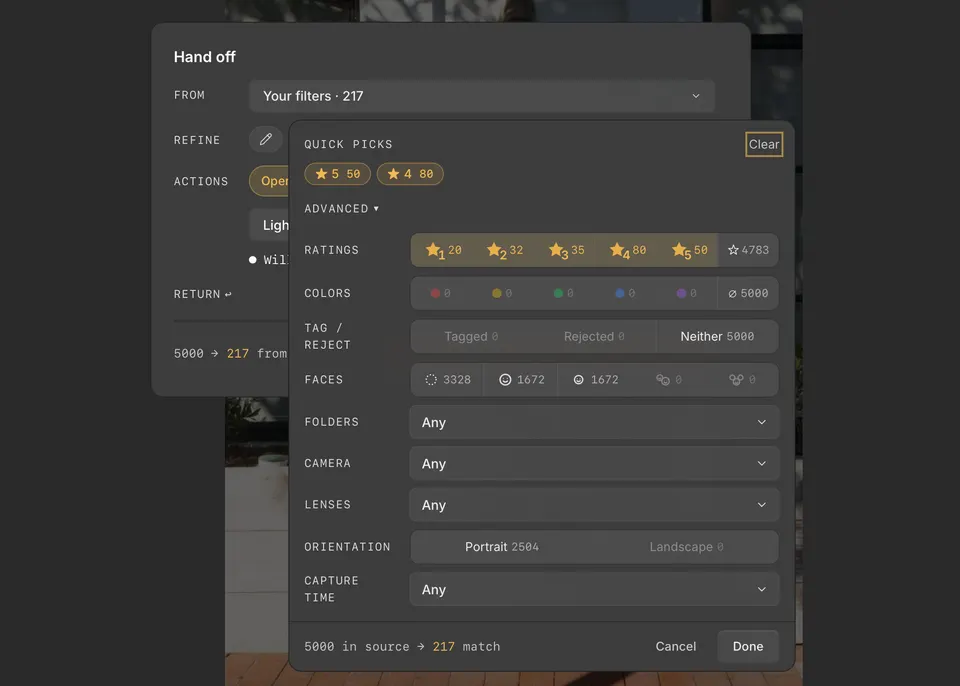
From
- Current photo — just the photo you were viewing.
- Your selection — the photos you had selected.
- Your filters — the photos your workspace filters were showing.
- All photos — every photo in the collection.
- Saved sets — a set you saved from an earlier handoff.
Refine
Click Add refinements to narrow the set, then click Done.
- Quick picks — one-click choices built from the ratings and tags you have used, such as 4 & up.
- Advanced — File type, Capture time, Folders, Cameras, Lenses, Ratings, Colors, Tag / Reject, and Faces.
Save a set for later
Under Return, click + Save set to name the photos you are handing off. The set appears under Saved sets in From, so you can hand the same photos off again, for example after re-syncing edits from another app.