Preview Edits shows your photos with edits applied while you cull, so you can judge them as they'll look edited. It shows either the edits already in each photo's XMP, or a Colorbration.
Turn it on
- Click Preview Edits in the title bar.
- Turn on Show Edits. You can also press J, or right-click the button.
- Under Show, choose Existing edits to see the edits in each photo's XMP, or choose a Colorbration.
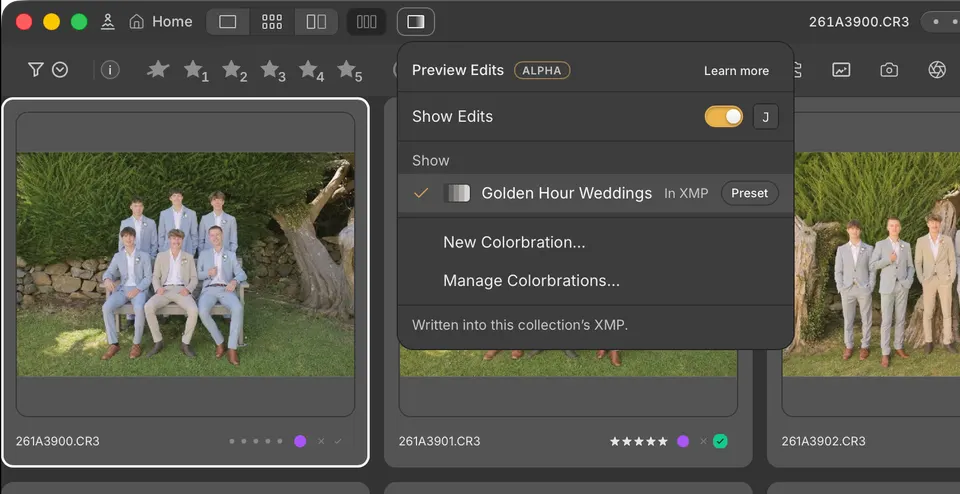
The count beside Existing edits is how many photos have edits in their XMP. Cullibrate notes this whenever it reads XMP: as you import, and when you resync external XMP changes.
Speed over colour accuracy
Preview Edits prioritises workspace speed over colour accuracy. Instead of processing each RAW file the way Lightroom does, it applies the edit to the preview Cullibrate already shows, using a small model of how the edit changes colour and tone. Moving between photos stays nearly as fast as without it.
Treat it as a close preview, not the final result. Colours and tones can differ from Lightroom, especially for strong edits. Lightroom Classic shows the exact result.
What it shows
- White balance: temperature and tint.
- Tone: exposure, contrast, highlights, shadows, whites and blacks.
- Not shown yet: masks, curves, colour mixing, presence, detail, lens corrections and effects. They stay in your edits; only the preview leaves them out.
With a Colorbration
With a Colorbration chosen, Preview Edits shows on every RAW photo what the Colorbration would write into its XMP. Nothing is written until an import with Write to XMP, or a Handoff. See Edit with a Colorbration.
If the import already wrote the Colorbration into this collection's XMP, Preview Edits marks it In XMP and leaves out Existing edits, because those edits are the Colorbration's.