Handoff imports your selects into Capture One. On a Mac you choose the catalog or session; on Windows, Handoff opens Capture One's own Import dialog.
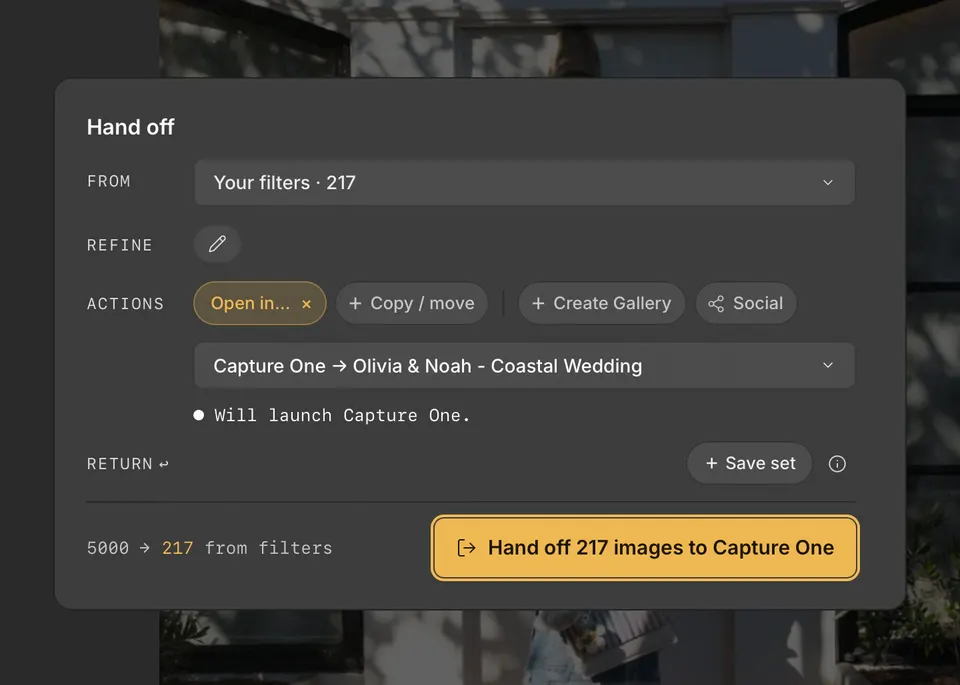
On a Mac
- Press H to open Handoff, and choose your selects with From and Refine.
- Under Actions, click Open in…, then point to Capture One.
- Choose the open document, a recent catalog or session, Choose existing…, or + New catalog….
- Click the Handoff button, such as Hand off 217 images to Capture One.
Cullibrate imports the photos into that document. In a catalog, the files stay where they are; in a session, they are imported into the session folder. Photos already in the document are skipped, and the imported photos are selected when Capture One comes forward.
On Windows
- Under Actions, click Open in…, then choose Capture One.
- Click the Handoff button. Capture One opens its Import dialog on the folder your selects are in.
- Choose the photos to import and finish the import in Capture One.
What travels with your photos
Capture One reads ratings and colour labels from the XMP Cullibrate saves as you cull. Cullibrate's tagged and rejected choices have no equivalent field that Capture One reads.